
- Home
- Brand
- Item Diameter
- Items Included
- Material
- Abs (31)
- Aluminum (192)
- Aluminum, Chrome (19)
- Aluminum, Leather (24)
- Black Leather (28)
- Carbon Fiber (75)
- Chrome (26)
- Chrome, Wood (22)
- Leather (497)
- Leather / Alcantara (19)
- Leatherette (35)
- Metal (28)
- Natural Fur (21)
- Plastic (50)
- Polyester (30)
- Pu Leather & Linen (23)
- Pvc Leather (73)
- Rubber (21)
- Steel (28)
- Wood (109)
- ... (4455)
- Type
- Airbag (25)
- Axles (7)
- Boss Kit (12)
- Carpet Mat (6)
- Cockpit Driving Seat (17)
- Dvd / Cd Player (7)
- Floor Mats (13)
- Horn (138)
- Horn Button (36)
- Interior Fittings (29)
- Racing Wheel (25)
- Rubber Mat (49)
- Seat Cover (21)
- Seat Cover Set (6)
- Shift Paddle (7)
- Steering Wheel (1516)
- Steering Wheel Cover (37)
- Steering Wheel Stand (28)
- Steering Wheels (10)
- Tuning / Parts (19)
- ... (3798)
- Warranty
IDATALINK MAESTRO ADS-MRR /RR Radio Replacement Interface With Steering Wheel Cont
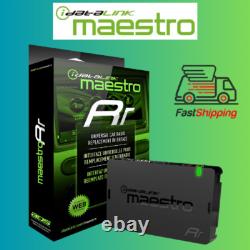
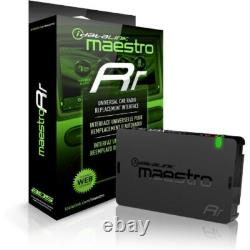
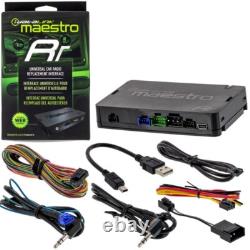


Details about the Maestro MRR. IDatalink's Maestro ADS-MRR module, along with the correct interface harness for your vehicle, allows you to install a new car stereo in select late-model Ford, GM, Chrysler, or Volkswagen vehicles while retaining your factory steering wheel audio controls and the use of your factory amplifier, if present.
Here's how it works. First, you connect the Maestro to your Windows-based computer (not compatible with Mac) using the included USB cable, visit site, and follow the instructions. Once the unit has been "flashed, " it's ready to go. Keeping your factory features with an iDatalink-ready car stereo. Ford: You'll keep your SYNC system, including the factory Bluetooth, satellite radio (in select vehicles, see Details), steering wheel audio controls, and other great features.GM: You'll retain the use of OnStar® system, along with your steering wheel audio controls, your factory amp, and safety warning chimes. Chrysler: You'll retain the use of the Uconnect® system (including voice command), along with your steering wheel audio controls and factory amp. Volkswagen: You'll retain your VW's Bluetooth, the factory digital amplifier and fader, plus VW's media device interface. Select Kenwood receivers allow you to display navigation info on your VW's multi-function screen. Important Note: You will also need an additional Maestro vehicle-specific wiring harness that connects your new receiver to the ADS-MRR module and your vehicle's wiring.
Retain steering wheel audio controls, too The ADS-MRR module also allows you to use your factory steering wheel audio controls with your new receiver. Using the intuitive web programming interface, each factory button can be assigned a specific radio function.
Better yet, you can also assign a secondary "press and hold" radio function to each factory button, effectively doubling what can be controlled. Radio replacement interface module 23" Eighteen-pin harness with bare wires on other end 23" Three-pin harness with bare wires on other end 23" Four-pin harness with bare wires on other end 23" Ten-pin harness with bare tin wires on other end (black connector) 23" Ten-pin harness with bare tin wires on other end (green connector) 23" Four-pin harness with a male 3.5mm connector/bare wire on other end 7 mini-USB (type-B) to USB (type-A) cable 4-pin to 4-pin Serial Port Cable Cable with 3.5mm miniplug.